Every morning I ask one question. What do I need to do today? Not tomorrow, next week or even yesterday; today. The car registration is due sometime, the shopping list has been sitting there since last week, I told a friend I would reach out, and I want to run 3 miles before it gets hot. Some of that belongs to today and some of it does not, and at six in the morning the only thing I actually need is the short version. Today is the screen TasksDojo opens to, and answering that one question is the whole job it has.
What needs to get done today is a question you can actually answer
Everything you have ever written down is a fine thing to keep and a terrible thing to read. Forty items is not a plan, it is a wall, and a list that takes real effort to read is a list you begin to avoid. That is how a system quietly stops working. Nothing dramatic happens, you quickly read it and then eventually just stop opening it, and the app that was supposed to keep you in the loop becomes one more thing you are behind on.
So TasksDojo keeps those two jobs on two screens. All Tasks holds everything you have captured and lets you search it, sort it and pull it apart however you want. Today holds one day, TODAY. A day is enough to read, and small enough to feel achievable, because you already know roughly what fits between breakfast and dinner. Productivity apps should give you a place to think about the whole picture and a separate place to just get through the week.
What Today in TasksDojo puts in front of you
The top of the screen is what is still open on the day you are looking at, in the order you are most likely to need it. Anything with a time on it comes first, in time order, so the dentist appointment at nine sits above the errand that only has to happen sometime. After that it sorts by priority, and after that by the list a task belongs to, so Work and Home stay grouped instead of alternating down the page. You should never have to hunt for the next thing.
Underneath that are three sections that each collapse and each carry a count. Ongoing Tasks are the ones that span several days and would otherwise repeat themselves at you every morning. Previous Days Open Tasks are the ones carried in from earlier. Completed Tasks are what you finished. Every one of them can be folded shut, so the day stays as short as you want it and the rest is one tap away when you need it. A quality productivity app lets you decide how much of your day you are looking at.
Previous is what happened, a place to know what you want to achieve
Work carries over. It carried over before you had an app and it will carry over after. The question is what your productivity solution does about it.
In TasksDojo it goes into its own section labeled Previous, in quiet gray, folded up if you want it folded. It never mixes into today’s open work, because the tasks you chose for today and the tasks that arrived from Thursday are two different things and merging them convolutes both. Each carried card also shows how long it has been waiting, a small abbreviated text indicating one day, one week or more, tucked into the row, and that label turns orange once a task has been sitting for a week. That is the app pointing at something, gently, one time.
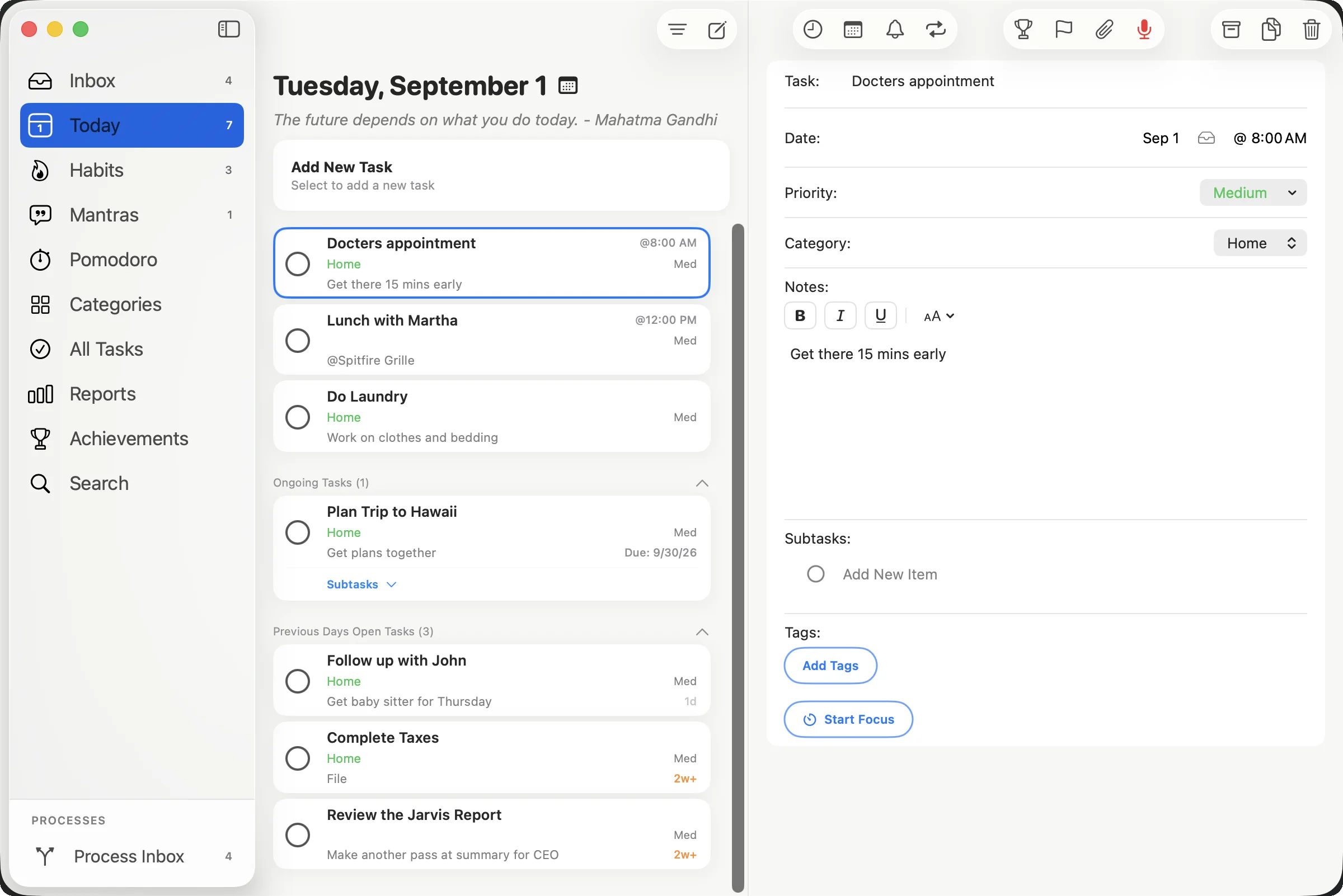
It never turns red. Red belongs to the tasks you marked Critical and nothing else, which means red still means something when you see it. A productivity app that turns everything red on a bad Wednesday has told you nothing, and the color has stopped meaning anything by Friday.
Completed stays on the day you did it
Finishing something should leave a mark. The Completed section counts what you got done and keeps it on the screen rather than making it vanish, and it goes by the day you actually completed the task, not the day the task was assigned to. Clear out something you had planned for last Thursday and it lands in today’s Completed, because today is the day you did it and today is the day that deserves the credit.
This matters more than it sounds. A day where you handled four things that were never on the plan is a day worth counting, and a productivity app that only shows the three you did not get to is hiding the better half of it. Six completed and three open is a real Tuesday and a good one. Productivity apps should be able to show you what a day was, and not only what is left of it.
Today is a date, and you can move it
The heading at the top is the day you are looking at, with a small calendar icon on it. Tap it and a strip of days opens that runs a full year in each direction, so tomorrow, next Monday and the Thursday you want to get ahead of are all one flick and one tap away. Pick any of them and the whole screen becomes that day, with the same sections and the same order. Tap Today and you are back.
That turns planning into part of the routine instead of a separate exercise. Sunday evening you look at Monday, move two things off it, and Monday morning has already been decided. Prioritizing is easier the day before, when the day has not started yet.
The Today screen should look like your day
A screen you open every single morning has to fit you, so most of Today is yours to set. Task cards come in four styles, from Basic, which is close to a plain line of text, through Standard and Dynamic to Condensed, which packs the most tasks onto one screen. The filter gives you All, Active or Completed, a switch for whether recurring tasks appear at all, and your lists and tags, so a workday can show only Work when that is what you need.
Then there is the quote under the date, which is the smallest feature on the screen and the one I use most. One shows each day and tapping it moves to the next. You can write your own, turn off the ones that do not land, reset back to the originals, or switch the whole thing off if you would rather start the morning without one. The first thing you read each day is worth choosing yourself.
The same question on every surface
The question does not change when you put the phone down, so neither does the answer. The Today widget sits on the Home Screen and the Mac desktop with the day’s tasks and a greeting that rolls over on its own through the morning and afternoon. On Apple Watch, Today is a hub with your task list and count rows for Previous Days, Ongoing Tasks, Habits and Mantras, and you can complete anything from your wrist. Mac and iPad give the day a full split view with the task open beside the list. The badges on the bottom bar carry the counts everywhere, so what is left today is visible before you tap anything, and all of it syncs through iCloud.
Why Today is the whole idea
Tasks get done and leave, habits get repeated, mantras set the tone before the day gets a vote, and the focus timer is there when something needs one uninterrupted block. That is the daily practice, and Today is where it happens. Not a dashboard of everything you have ever planned and not a report of how you are trending, just the day in front of you with what is open, what carried over and what you have already handled.
Doing that consistently for eleven weeks is a life change. Doing it perfectly once is a Tuesday. Today only has to make the question easy enough to keep asking.
TasksDojo is on iPhone, iPad, Mac, and Apple Watch. Free.
Tasks, habits, and daily mantras in one practice. iPhone, iPad, Mac, and Apple Watch. Free.